> For the complete documentation index, see [llms.txt](https://docs.zipy.ai/llms.txt). Markdown versions of documentation pages are available by appending `.md` to page URLs; this page is available as [Markdown](https://docs.zipy.ai/product-features/oopsie-ai-agent.md).
# Oopsie AI Agent
### What is Oopsie AI?
Oopsie AI identifies and highlights errors that directly affected what users saw or experienced in your product. This AI Agent watches all sessions and errors in real time and bubbles up the important customer experience problems.
It filters out background or non-impacting technical errors and focuses only on those that visibly disrupted the user’s experience.
\
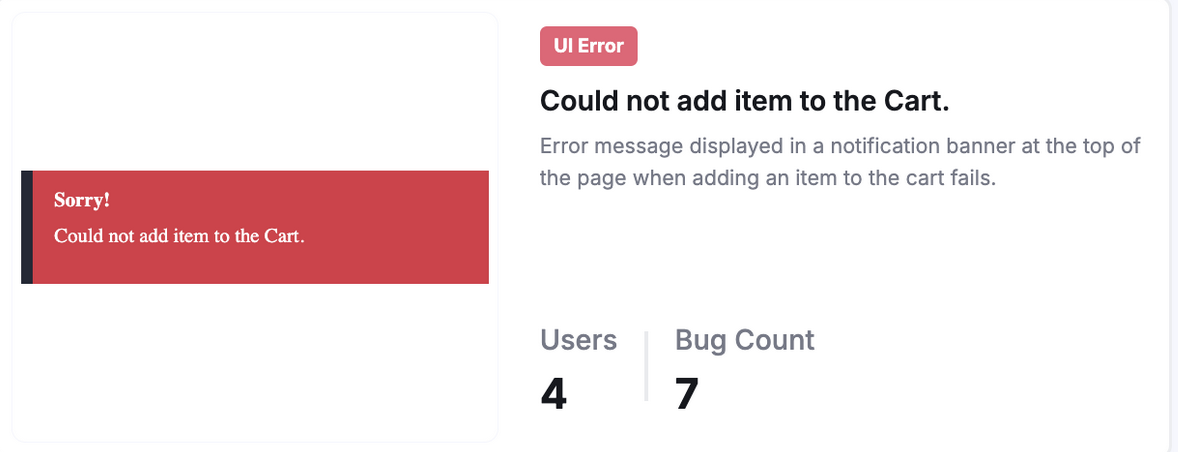
When an error impacts a user, Oopsie AI uses DOM and event data to show how the error appeared on screen and what the user was doing at that moment.\
This helps teams understand the real user impact of every issue — not just the code failure.
### Example Visuals
Example 1: Login Error
* Reconstructed Screen:
Example 2: Cart Error
* Reconstructed Screen:
***
### Why It Matters
Most error logs show what failed.\
Oopsie AI shows which failures actually mattered to users.
By surfacing only user-impacting errors, Oopsie AI helps you:
* Prioritize issues that visibly affected users
* Understand the user’s screen context at the time of error
* Fix problems that truly impact user experience
***
### Access Oopsie AI
1. Go to your Zipy Dashboard → Oopsie AI.
2. Browse recent AI-generated error visuals.
3. Click any image to view the session replay and understand the root cause instantly.
Please reach out to support for any further questions.